All 18 Marketing Components — A Complete Guide
Every drop-in marketing component included in MantleKit. Copy-paste examples for heroes, pricing, testimonials, blog cards, and more.
MantleKit ships with 18 production-ready marketing components. Every component is theme-aware, responsive, and accepts data as props — no hardcoded content. This guide covers each one with usage examples.
The live previews below render the real components, so what you see here stays aligned with the current MantleKit design system rather than drifting away as the code evolves.
Hero Sections
Three hero variants for different landing page styles.
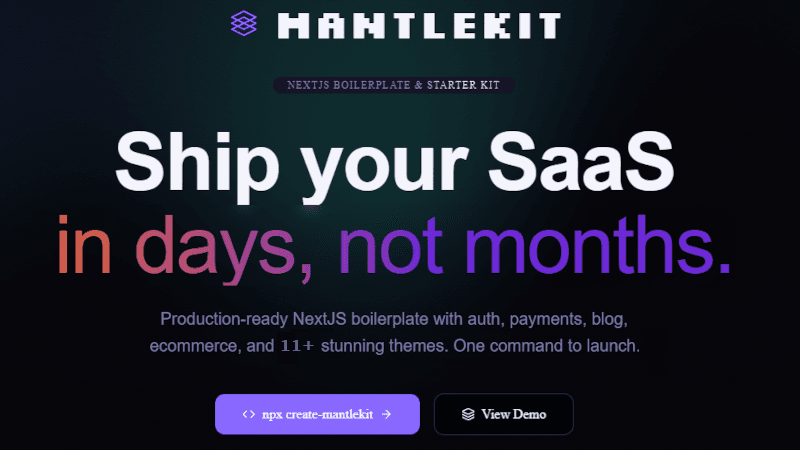
HeroCentered
The default hero. Centered headline, subheadline, and CTA buttons.
Ship a real product
without rebuilding the basics.
MantleKit bundles auth, payments, blog, ecommerce, support, and a polished dashboard into one production-ready base.
import { HeroCentered } from "@/components/marketing/hero-centered";

<HeroCentered
  eyebrow="Now in Beta"
  headline="Ship your SaaS in days, not months"
  subheadline="Auth, payments, blog, ecommerce — pre-built and production-ready."
  primaryCta={{ label: "Get Started", href: "/pricing" }}
  secondaryCta={{ label: "View Demo", href: "/demo" }}
/>
HeroSplit
Image on one side, copy on the other. Great for product showcases.
Show the interface
before the customer even scrolls.
Use the split hero when your screenshots, dashboards, or product visuals are a core part of the pitch.
import { HeroSplit } from "@/components/marketing/hero-split";

<HeroSplit
  headline="Build faster with MantleKit"
  subheadline="Everything you need to launch your next project."
  image="/images/hero-screenshot.png"
  primaryCta={{ label: "Start Building", href: "/pricing" }}
/>
HeroVideo
Centered hero with an embedded video. Supports YouTube and self-hosted.
import { HeroVideo } from "@/components/marketing/hero-video";

<HeroVideo
  headline="See MantleKit in action"
  subheadline="Watch a 2-minute walkthrough of what you get."
  videoUrl="https://youtube.com/embed/your-video-id"
  primaryCta={{ label: "Try It Free", href: "/pricing" }}
/>
Social Proof
Testimonials
Rotating testimonial carousel with optional avatar images.
Developers keep saying the same thing
“This saved me from stitching together auth, payments, content, and dashboard tooling from five different repos.”
Talia Morgan
Indie SaaS Founder
import { Testimonials } from "@/components/marketing/testimonials";

<Testimonials
  eyebrow="What People Say"
  headline="Loved by developers"
  testimonials={[
    {
      quote: "Saved me weeks of setup time.",
      author: "Sarah Chen",
      role: "Indie Hacker",
      avatar: "/images/avatar-sarah-chen.jpg",
    },
    {
      quote: "The theme quality is in a different league.",
      author: "Marcus Rivera",
      role: "CTO, Rivera Digital",
      avatar: "/images/avatar-marcus-rivera.jpg",
    },
  ]}
/>
LogoCloud
Trusted-by logo strip. Pass company names and they render as styled text (no image files needed).
import { LogoCloud } from "@/components/marketing/logo-cloud";

<LogoCloud
  label="Trusted by teams at"
  logos={["Vercel", "Supabase", "Stripe", "Linear", "Notion"]}
/>
StatsSection
Key metrics in a clean grid layout.
import { StatsSection } from "@/components/marketing/stats-section";

<StatsSection
  eyebrow="By the Numbers"
  headline="Built for scale"
  stats={[
    { value: "2,400+", label: "Teams using MantleKit" },
    { value: "99.9%", label: "Uptime" },
    { value: "< 1hr", label: "Average setup time" },
  ]}
/>
Features & Content
FeaturesGrid
Icon-driven feature cards in a responsive grid.
Everything you need to launch
These cards stay theme-aware, so the same content can look radically different across your selected design system.
Authentication
Google OAuth, GitHub OAuth, and email/password flows already wired in.
Payments
Stripe, Lemon Squeezy, and Polar support with hosted checkout and webhook handling.
Themes
Multiple polished themes built on shared components instead of duplicated code.
Admin Dashboard
CMS, analytics, kanban, moderation, tickets, and AI tools in one backend workspace.
Content
Blog, knowledge base, and SEO-ready marketing pages are all included.
Deployment
Built for Vercel with an onboarding flow that gets you to first deploy fast.
import { FeaturesGrid } from "@/components/marketing/features-grid";
import { Shield, CreditCard, Palette } from "lucide-react";

<FeaturesGrid
  eyebrow="Features"
  headline="Everything you need"
  features={[
    {
      icon: Shield,
      title: "Authentication",
      description: "Google OAuth, GitHub OAuth, email/password.",
    },
    {
      icon: CreditCard,
      title: "Payments",
      description: "Stripe, Lemon Squeezy, or Polar.",
    },
    {
      icon: Palette,
      title: "13+ Themes",
      description: "Each visually distinct. CSS variable-driven.",
    },
  ]}
/>
ComparisonTable
Side-by-side feature comparison between your product and alternatives.
Why teams pick MantleKit
A comparison block helps buyers understand where you win before they dig into every feature page.
| Feature | MantleKit | DIY Build | Typical Boilerplate |
|---|---|---|---|
| Multiple polished themes | |||
| Auth + payments + ecommerce | Partial | ||
| Admin dashboard included | Partial | ||
| CLI project stripping | |||
| Docs + support content |
import { ComparisonTable } from "@/components/marketing/comparison-table";

<ComparisonTable
  eyebrow="Compare"
  headline="Why MantleKit?"
  product="MantleKit"
  competitors={["DIY", "Other Boilerplates"]}
  features={[
    { name: "13+ Themes", values: [true, false, false] },
    { name: "Ecommerce", values: [true, false, "Partial"] },
    { name: "CLI Setup", values: [true, false, false] },
  ]}
/>
TimelineSection
Vertical timeline for roadmaps, changelogs, or company history.
import { TimelineSection } from "@/components/marketing/timeline-section";

<TimelineSection
  eyebrow="Roadmap"
  headline="What's coming"
  items={[
    { date: "Q1 2026", title: "Launch", description: "Public release with 13+ themes." },
    { date: "Q2 2026", title: "Marketplace", description: "Community theme marketplace." },
  ]}
/>
Pricing
PricingTable
Responsive pricing cards with feature lists and CTA buttons.
Simple, transparent pricing
These cards adapt to your active theme while keeping a consistent information hierarchy.
import { PricingTable } from "@/components/marketing/pricing-table";

<PricingTable
  eyebrow="Pricing"
  headline="Simple, transparent pricing"
  tiers={[
    {
      name: "Starter",
      price: "$79",
      description: "Perfect for your first SaaS",
      features: ["1 Theme", "Auth + Payments", "MDX Blog"],
      cta: { label: "Get Started", href: "/checkout/starter" },
    },
    {
      name: "Pro",
      price: "$149",
      description: "Everything you need",
      features: ["All Themes", "Ecommerce", "All Providers"],
      cta: { label: "Get Pro", href: "/checkout/pro" },
      featured: true,
    },
  ]}
/>
PricingComparison
Detailed feature-by-feature pricing comparison grid.
import { PricingComparison } from "@/components/marketing/pricing-comparison";

<PricingComparison
  eyebrow="Compare Plans"
  headline="Find your perfect plan"
  tiers={["Starter", "Pro", "Agency"]}
  categories={[
    {
      name: "Core",
      features: [
        { name: "Themes", values: ["1", "All 13+", "All 13+"] },
        { name: "Payment Providers", values: ["1", "3", "3"] },
      ],
    },
  ]}
/>
Team & Contact
TeamSection
Team member grid with photos, roles, and optional bios.
import { TeamSection } from "@/components/marketing/team-section";

<TeamSection
  eyebrow="Team"
  headline="Meet the Team"
  members={[
    {
      name: "Sarah Chen",
      role: "Lead Engineer",
      image: "/images/staff-sarah-chen.jpg",
      bio: "Full-stack engineer building developer tools.",
    },
  ]}
/>
ContactForm
Ready-to-use contact form with validation.
import { ContactForm } from "@/components/marketing/contact-form";

<ContactForm />
The form renders name, email, and message fields. Wire it to your preferred backend (API route, Resend, etc.) by editing the form action.
Blog & Content
BlogCards
Marketing-style blog preview cards with optional images.
import { BlogCards } from "@/components/marketing/blog-cards";

<BlogCards
  eyebrow="Blog"
  headline="Latest from the team"
  posts={[
    {
      title: "Getting Started with MantleKit",
      excerpt: "Everything you need to go from zero to deployed.",
      href: "/blog/guides/getting-started",
      image: "/images/blog-dashboard.jpg",
      tag: "Guide",
      date: "Mar 28, 2026",
    },
  ]}
/>
Conversion
CtaSection
Full-width call-to-action banner.
Ready to stop rebuilding boilerplate?
Start with a product that already feels finished.
Use this section near the bottom of your page when you want one clear, high-confidence next step.
import { CtaSection } from "@/components/marketing/cta-section";

<CtaSection
  headline="Ready to ship?"
  subheadline="Get MantleKit and launch your project this weekend."
  primaryCta={{ label: "Get Started", href: "/pricing" }}
  secondaryCta={{ label: "View Demo", href: "/demo" }}
/>
NewsletterSignup
Email capture form with customisable copy.
import { NewsletterSignup } from "@/components/marketing/newsletter-signup";

<NewsletterSignup
  eyebrow="Newsletter"
  headline="Stay in the loop"
  subheadline="Get updates on new themes, features, and tips."
/>
AnnouncementBanner
Dismissible top-of-page banner for announcements and promotions.
import { AnnouncementBanner } from "@/components/marketing/announcement-banner";

<AnnouncementBanner
  message="MantleKit v2 is here!"
  linkText="See what's new"
  linkHref="/blog/guides/whats-new"
/>
CheckoutModal
Hosted checkout redirect modal. Integrates with your configured payment provider.
import { CheckoutModal } from "@/components/marketing/checkout-modal";

<CheckoutModal
  tier="pro"
  price="$149"
  features={["All Themes", "Ecommerce", "Priority Support"]}
/>
Assembling a Landing Page
Every component is independent — import what you need and compose your page:
import { HeroCentered } from "@/components/marketing/hero-centered";
import { LogoCloud } from "@/components/marketing/logo-cloud";
import { FeaturesGrid } from "@/components/marketing/features-grid";
import { Testimonials } from "@/components/marketing/testimonials";
import { PricingTable } from "@/components/marketing/pricing-table";
import { CtaSection } from "@/components/marketing/cta-section";

export default function LandingPage() {
  return (
    <>
      <HeroCentered {...heroProps} />
      <LogoCloud {...logoProps} />
      <FeaturesGrid {...featureProps} />
      <Testimonials {...testimonialProps} />
      <PricingTable {...pricingProps} />
      <CtaSection {...ctaProps} />
    </>
  );
}
All components automatically adapt to whichever theme is active in mantle.config.ts. No extra work needed — switch themes and everything updates.
Comments
Sign in to leave a comment.
No comments yet. Be the first!